 WhatsApp Now
Key takeaways: Task management software assigns work, sets deadlines, and tracks completion across teams. Most institutions go live in 2–3 days. It works best connected with event, notice, and HRMS modules.
In this guide
What is task management software?
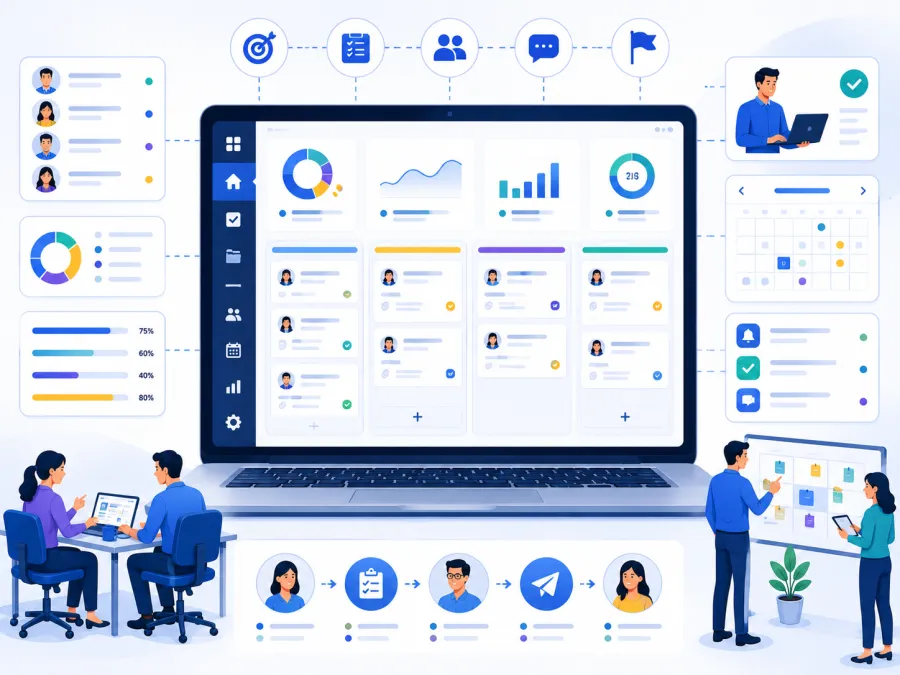
Task management software is a system for assigning work, setting deadlines, and tracking completion across an institution's teams — so every task has an owner, a due date, and a visible status instead of living in verbal instructions and chat messages.
Instead of "I thought you were handling that," every task is assigned to a person, with a deadline and a status everyone can see. When something is overdue, it surfaces — before it becomes a problem.
For schools, ashrams, and trusts, where maintenance, events, admin, and seva all generate work, this turns scattered to-dos into accountable, finished tasks.
What changes when tasks are tracked
Good task software turns verbal instructions into accountable, finished work.
The real problems it solves
Here is what breaks down when work runs on verbal instructions.
Forgotten instructions
Verbal tasks get lost. Software assigns them with a record.
No ownership
Nobody's sure who's responsible. Each task has a named owner.
Missed deadlines
Work slips quietly. Due dates and reminders surface it.
No visibility
Status is unknown. A shared board shows progress.
Repeated chasing
Managers re-ask constantly. Status replaces the chasing.
No work data
Workload and bottlenecks are invisible. Reports surface them.
The pattern: Campus work is handed out verbally and in chats. Most of it gets done — but the few tasks that slip cause the disproportionate problems, because nobody noticed they were forgotten until it was too late.
Work slipping through the cracks?
Tell us what kind of tasks your teams handle on WhatsApp. We will map the right DigiCampus task workflow for you.
Key features to look for
Evaluate task software against your real pattern — recurring work, team coordination, and accountability.
Task workflow from assign to closure
This is the operating flow most institutions need from task software.
- Task assignment assign every task to a named owner with details.
- Deadlines and reminders set due dates and trigger reminders.
- Status tracking open, in-progress, and done, visible to all.
- Recurring tasks handle repeating work like maintenance checks.
- Team and personal views see your tasks and your team's at a glance.
- Event and notice links turn event logistics into tasks, remind via notices.
- Priorities and categories organise by urgency and type.
- Reports and exports pending, overdue, and completed work for management.
Want to see tasks tracked?
We'll assign a few real tasks and track them on a setup that matches you — in 20 minutes on WhatsApp.
Who needs task management software
Any institution where teams handle ongoing work benefits from tracked tasks.
Schools
Admin, maintenance, exam, and event tasks across departments.
Ashrams
Seva, maintenance, and programme tasks across volunteers.
Charitable trusts
Operational and programme work across units.
Temples and mutts
Festival, maintenance, and daily duties.
Residential campuses
Hostel, mess, and facility tasks tracked to closure.
NGOs
Field, programme, and admin work across teams.
Rule of thumb: If managers spend their day re-asking 'did that get done?', you need task management software.
Verbal vs. tracked: a direct comparison
| Task | Manual / Paper | DigiCampus |
|---|---|---|
| Assign a task | Tell someone verbally | ✓ Assigned with owner and record |
| Set a deadline | Hope they remember | ✓ Due date with reminders |
| Know the status | Ask repeatedly | ✓ Status visible on the board |
| Catch overdue work | Notice when it's a problem | ✓ Overdue flagged automatically |
| Handle recurring work | Re-instruct each time | ✓ Recurring task set once |
| Review workload | No data | ✓ Pending and done report, export PDF/Excel |
How to choose the right task software
For institutions, prioritise simplicity and adoption:
What implementation actually looks like
Getting started is quick.
- Set up teams — departments and roles. A one-time setup.
- Add recurring tasks — maintenance and routine work.
- Connect events and notices — for logistics and reminders.
- Train the team — a short walkthrough of assigning and updating tasks.
- Go live — assign your first tasks.
At DigiCampus, most institutions are live within 2–3 working days of signing up. We help you set up teams and recurring tasks before you go live.
Ready to stop work slipping?
Tell us what your teams handle on WhatsApp. We'll confirm exactly what setup looks like for you — no commitment needed.
Common questions
What is task management software used for?
It is used to assign tasks, set deadlines, track completion, and manage campus work across teams from one shared system.
Is it useful for small institution teams?
Yes. Even a small team benefits when work stops depending on verbal instructions and starts being assigned, tracked, and closed visibly.
Does task management connect with events and HRMS?
Yes. Event logistics become tracked tasks, reminders go via notices, and tasks link to the staff who own them in HRMS.
See it on your campus
The best way to evaluate task software is to assign a few real tasks and watch them get tracked to closure. A 20-minute walkthrough is enough to know whether it fits.